
Cleobetra account setup guide
Cleobetra Account Guide: Registration, Login and Verification
 Available in GB
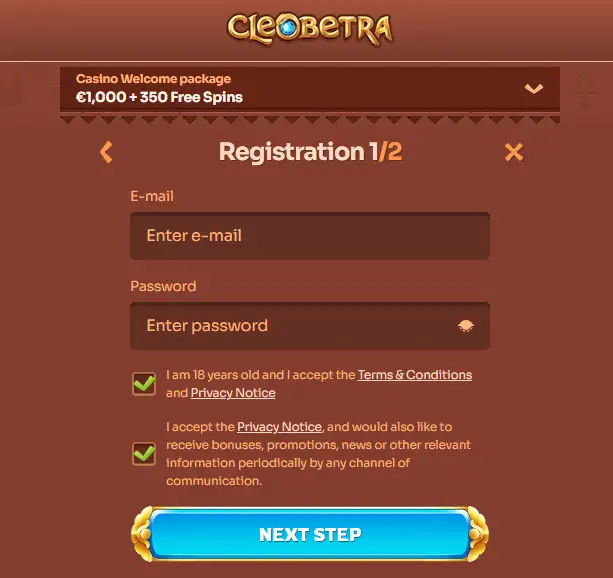
The current Cleobetra registration page starts with a welcome-choice screen: casino offer, sport offer, promo code or an option to continue without a welcome bonus. The public page also states that Cleobetra accepts customers over 18. A completed UK-specific country-selector flow is not confirmed here, so country choices, address fields and later account controls should be checked in the live registration process. Treat eligibility as a checkpoint before funding the account. After registration, Cleobetra’s login page supports email or phone login with a password and provides password recovery. Verification can also be requested, including identity, address and payment-ownership evidence, so account details should be accurate from the start.

Table of Contents
- Four checks before creating a Cleobetra account
- What the current Cleobetra registration page actually shows
- Choose the bonus path deliberately, not automatically
- Use personal details you can verify later
- Cleobetra login supports email or phone
- Country eligibility is a checkpoint, not an assumption
- Verification can happen before a withdrawal – prepare before depositing
- A pre-deposit account checklist
- Do not create a second account to solve a first-account problem
- Registration, verification and licensing are different checks
- A sensible order for a new Cleobetra account
- What to verify before funding a new Cleobetra account
Four checks before creating a Cleobetra account
Age
Cleobetra’s current registration and login pages state that it accepts customers over 18 years of age.
Country eligibility
Confirm the country and account options shown in the live registration flow. Do not assume a UK selector is available; check the live registration options.
Bonus choice
The registration entry point currently lets users choose a casino offer, sport offer, promo code or no welcome bonus.
Verification readiness
Cleobetra may request identity, address and payment-ownership evidence, so use accurate personal and payment details from the beginning.
What the current Cleobetra registration page actually shows
The safest way to describe registration is to separate what is visible now from what a generic casino form might usually contain. The current Cleobetra registration page exposes a welcome-choice stage. It presents a casino welcome option, a sport welcome option, a promo-code choice and an option to proceed without a welcome bonus. It also links back to login for existing users.
That is enough to confirm that bonus selection is part of the current entry point, but it is not enough to publish a fictional step-by-step list of later fields. The accessible page did not expose a completed UK-specific country-selection screen, postcode field or final account confirmation sequence. If the live flow asks for those details, follow what is on screen rather than an outdated description.
This matters because registration interfaces change. An exact step count or permanent field list can become wrong after a design update. The stable advice is to read each field, use accurate information and pause before depositing until country eligibility and account status are clear.
Choose the bonus path deliberately, not automatically
The first visible registration decision is promotional, so it is worth making before entering the account with assumptions. Selecting a casino offer, sport offer or promo code can attach terms to the account that affect how promotional funds are used. Choosing no welcome bonus can also be a valid path when the user wants to understand the account first.
This account page does not repeat current bonus amounts, wagering figures or currency conditions because those details belong in the Cleobetra bonus page and can change independently of registration. Before opting in, open the current terms and check eligibility, qualifying deposit rules, wagering and expiry. Do not assume that an offer displayed in a generic English flow is automatically a UK or GBP offer.
The practical point is that bonus selection is not a decorative screen. It can change what happens to the first deposit. Make the choice only after you know whether you want the promotional terms attached to the account.
Use personal details you can verify later
Account verification becomes harder when registration data and documents do not match. Cleobetra may request identity, proof of address and evidence that a payment method belongs to the account holder. That makes accurate registration data operationally important, not just administrative.
Enter your real legal details exactly as requested by the live form. Avoid nicknames in fields intended for legal names, and do not reuse another person’s phone number or payment account simply because it is convenient. If the service later asks you to prove ownership, mismatched data can turn a routine review into a longer support conversation.
If you discover that personal information is wrong after registration, Cleobetra’s help material says users should contact Customer Support with the correct information and the reason for the change. Keep a record of the request rather than creating a second account to work around an error.
Cleobetra login supports email or phone
The current Cleobetra login page gives users an email tab and a phone tab, with a password field and a “Forgot your password?” route. That makes the basic recovery path clear without inventing additional login methods. If you registered with one identifier, remember which one you normally use before assuming the account has disappeared.
For security, use a password that is unique to this account and store it in a reputable password manager rather than reusing a password from email, banking or social media. Do not share one-time codes or password-reset links with anyone claiming to be support. A genuine support conversation should not require you to send your account password.
On a shared device, log out after use and avoid saving credentials in a browser profile that other people can open. On your own phone, biometric device locking can protect access to the browser or password manager, but it does not replace the account password itself.
Country eligibility is a checkpoint, not an assumption
UK eligibility still depends on the options shown in the live registration screen. The current public registration page did not expose a complete UK-specific country-selector sequence, so there is no basis here to promise that every UK address or configuration will pass registration.
Before depositing, confirm that the live form accepts your real country and contact details and that the account remains usable after any required confirmation. If the country you need is missing, blocked or rejected, do not pick another country simply to get through the form. That would create a mismatch between the account record, payment details and later verification.
This is also why registration should come before the payment decision. The Cleobetra payments page explains what to check in the cashier, but no deposit method should be treated as relevant until the account itself has passed the basic eligibility and setup steps shown to the user.
Verification can happen before a withdrawal – prepare before depositing
Cleobetra’s verification material confirms that customer due diligence may involve identity, address and payment-ownership evidence. A current help article also gives examples of possible documents, but that article is not a UK-specific guaranteed checklist and says requirements can vary. For that reason, this parent page does not publish a fixed document bundle or processing time.
The practical preparation is straightforward. Keep the identity document you actually use available, make sure your address details are current, and use payment methods that belong to you. If the account asks for evidence, follow the exact upload instructions and check whether the image is complete, readable and current before submitting it.
For a focused explanation of what is verified, what can vary and how to respond to a document request, use the Cleobetra KYC page. Separating the topics keeps this registration page from turning a variable verification process into a false fixed list.
A pre-deposit account checklist
| Checkpoint | What to confirm | Why it matters |
|---|---|---|
| Identity | Your legal name and account details are accurate | Later verification can compare the account with official documents |
| Country | Your real country is accepted in the live registration flow | A wrong country can create payment and verification conflicts |
| Contact route | You can access the email address or phone used for the account | Login recovery and account messages depend on reachable contact details |
| Bonus status | You know whether a welcome offer, promo code or no-bonus option is selected | The first deposit can interact with promotion terms |
| Verification | You can supply evidence if the account requests it | Incomplete checks can affect later account actions |
| Cashier | The deposit screen shows a method and terms you understand | Account setup and payment suitability are separate decisions |
Do not create a second account to solve a first-account problem
If login fails, personal information is wrong or verification is pending, the cleanest route is to resolve the existing account. A second account can create duplicate identity and payment records and make the original issue harder to explain. Use password recovery for access problems and support for personal-data corrections.
When contacting support, give the account identifier you normally use, explain the specific problem and preserve the response. Do not send a password. If documents are requested, use the secure account upload or the exact official route support provides rather than posting identity material in public reviews or social channels.
A good support record should answer three questions: what is wrong, when it started and what action the service has asked you to take. That is more useful than opening repeated chats with a different description each time.
Registration, verification and licensing are different checks
Being able to reach a registration page is not the same as proving local licensing, and a request for verification is not evidence of a particular licence. Keep these questions separate. The account flow tells you whether the brand is willing to proceed with the details you enter. Verification tells you what evidence the operator wants for that account. Licensing is a regulatory question handled on its own page.
This separation prevents two common mistakes: assuming that a working sign-up button proves UK regulatory coverage, or treating KYC as proof that the site follows a specific local scheme. Treat account setup and regulatory status as separate checks, and use the dedicated licence page for the latter.
A sensible order for a new Cleobetra account
- Open the official registration page and read the visible welcome-choice options.
- Confirm that your real age, country and contact details can be entered accurately when requested.
- Decide whether to select a welcome offer only after reading its current terms.
- Complete registration using contact details you control and a unique password.
- Log in and inspect the account for any verification or confirmation request.
- Only then open the cashier and assess the payment methods and live terms available to the account.
This order reduces the chance of funding an account before discovering that a basic profile or verification issue still needs attention.
What to verify before funding a new Cleobetra account
Before the first deposit, make sure the account reflects your real details, the live registration flow accepts the information you are entitled to use, you can access the email or phone attached to login, and you understand whether a welcome offer is selected. Be prepared for identity, address or payment-ownership checks, but do not rely on a static UK document list or promised processing time that has not been verified. Finally, inspect the signed-in cashier rather than assuming a method shown elsewhere applies to your account. Those checks turn registration from a button-click exercise into a controlled setup process. For the broader context around the brand, return to the Cleobetra UK review.
Published by the Cleobetra Casino team.